애니빌드.LAB
토론방
소스관련 서브 페이지 margin 수정 문의드립니다.
- 박**호
- 2018-03-20 10:50:46
- hit3353
- http://lab.anybuild.co.kr/bbs/qna/6966
안녕하세요.
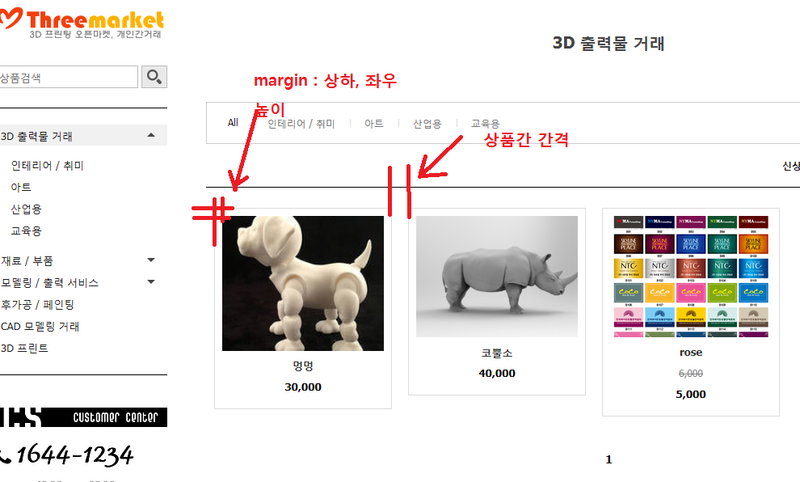
서브페이지에서 보여지는 상품 사진 테두리 margin의 css코드를 수정해보려고 하는데,
어디서 할 수 있는지 알려주시면 감사하겠습니다.
그리고, 상품간 간격 도 수정이 가능한지요?
게시글 공유
URL복사
댓글작성
열기 닫기
열기 닫기
[디자인관리 > 고급 디자인 관리 > CSS 파일관리]
layout_mobile.css
레이아웃 - 모바일 화면 (색상 : 상단, 컨텐츠, 하단, 상품 목록)
Line. 227
/* 매직레이아웃 - 메인, 상품목록, 상품검색 */
.mLayoutIndex * {@include boxSizing(border-box);}
.mLayoutIndex {
.wrap {
position:relative; margin:0 auto; @extend %clear;
.item {
overflow:hidden; float:left; margin:10px; padding:9px; border:1px solid $thumbLine; background:$thumbBg;
a {
display:block; width:$thumbImg; text-decoration:none;
.thumnail {
img {display:block; width:100%;}
}
.body {
position:relative; padding:10px 15px; text-align:center;
p {
line-height:16px;
&.subject {margin-bottom:10px; font-weight:bold; color:$subject;}
&.info {margin-bottom:5px; font-size:12px; color:$info;}
&.sijungPrice {margin-bottom:5px; font-size:12px; color:$sijung_price; text-decoration:line-through;}
&.price {margin-top:10px; font-weight:bold; color:$price;}
&.soldOut {display:inline-block; margin-top:10px; padding:1px 6px 3px; font-size:12px; color:$soldOut; border-radius:3px; background:$soldOutBg;}
&.eventIcon {margin-top:5px;}
}
}
}
&.empty {width:100%; margin:10px 0; padding:0; text-align:center; line-height:150px;}
}
}
}
# 상품간 간격은 다음을 수정해주세요.
margin:10px;
# 내부 상하좌우는 다음을 수정해주세요.
padding:9px;